I built my kid a French dictée app in 5 minutes
Last night I walked into the living room and found my daughter hunched over her laptop with Google Translate open. She was typing French words, pressing the speaker icon to hear the pronunciation, then quickly looking away before the next word appeared. She’d cover the screen with her hand, listen, then write the word down on a piece of paper.
She’s in Grade 6. Every week her teacher gives the class a dictée, a list of French vocabulary that the teacher reads aloud and the students have to write from memory. It’s a staple of French education, and it’s a great exercise. The problem is studying for it.
The problem with anglophone parents
My wife and I are both super anglophones. Our French pronunciation is, charitably, not great. My daughter knows this, which is why she wasn’t asking us for help. She’d figured out on her own that Google Translate could be her study partner: type the word, press play, look away, write it down.
But it doesn’t work well. You can see the word while the audio plays. You have to type each word individually. There’s no flow to it. She asked me to step in and read the words for her so she didn’t have to see the screen. So I sat down and started going through her list on Google Translate, pressing play one word at a time while she wrote them out.
It worked. But while I was sitting there, essentially being a human play button, I thought: there has to be a better way.
macOS has a secret weapon
Then I remembered: macOS has the say command. It ships with every Mac, it supports dozens of languages, and it has multiple French voices, including Amélie for Canadian French, which is exactly what my daughter needs. You can control the speed, the voice, everything. No API keys. No internet required.
All I needed was a simple UI to wrap it.
I opened a terminal, described what I wanted to Claude Code, and about five minutes later I had a working Python desktop app.
The app
The idea is simple. You paste in the dictée terms, one per line, pick a French voice, and hit start. The app reads them out one at a time. Your kid writes each word down, then clicks next (or presses the right arrow key) when they’re ready for the next one. When they’re done, they can reveal all the answers and check their work.
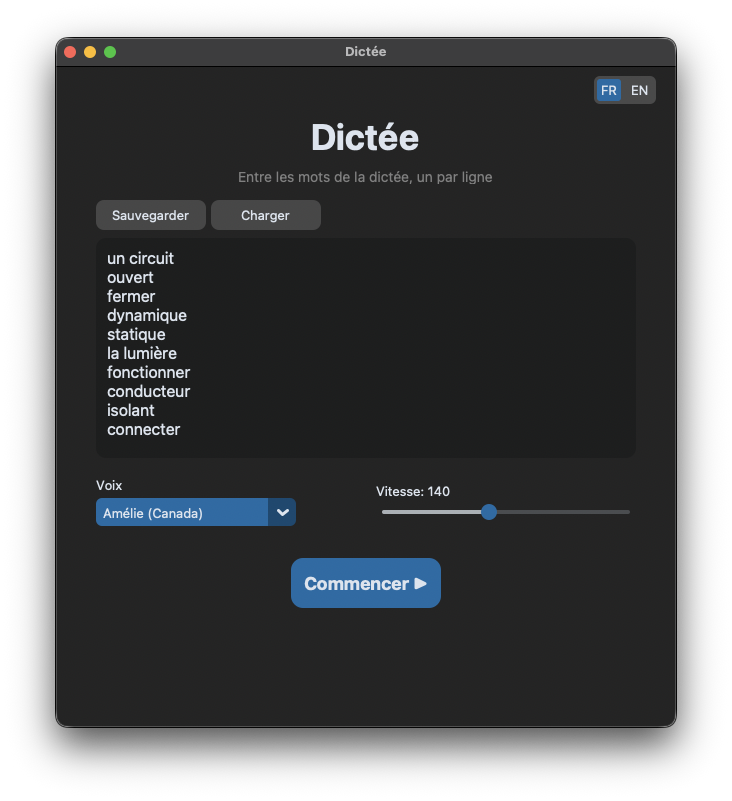
It parses numbered formats too, so you can paste a list straight from the teacher like 1-un circuit / 2-ouvert / 3-fermer and it strips the numbers automatically.
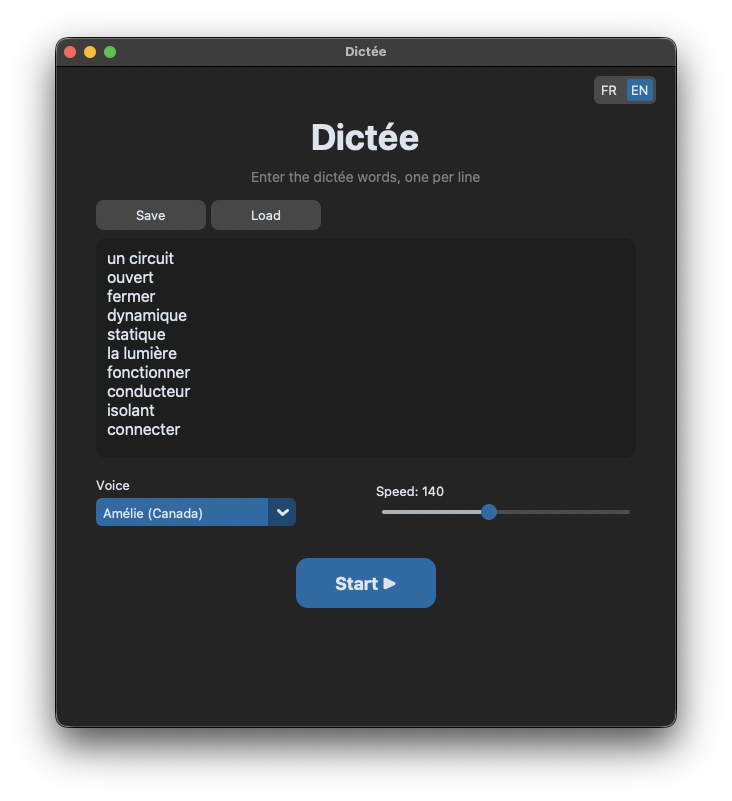
The whole UI toggles between French and English with a button in the corner, because my daughter prefers the app in English even though the words are French. You can save and load dictée lists so you can revisit previous weeks. And there’s a speed slider because some words need to be read slower than others.
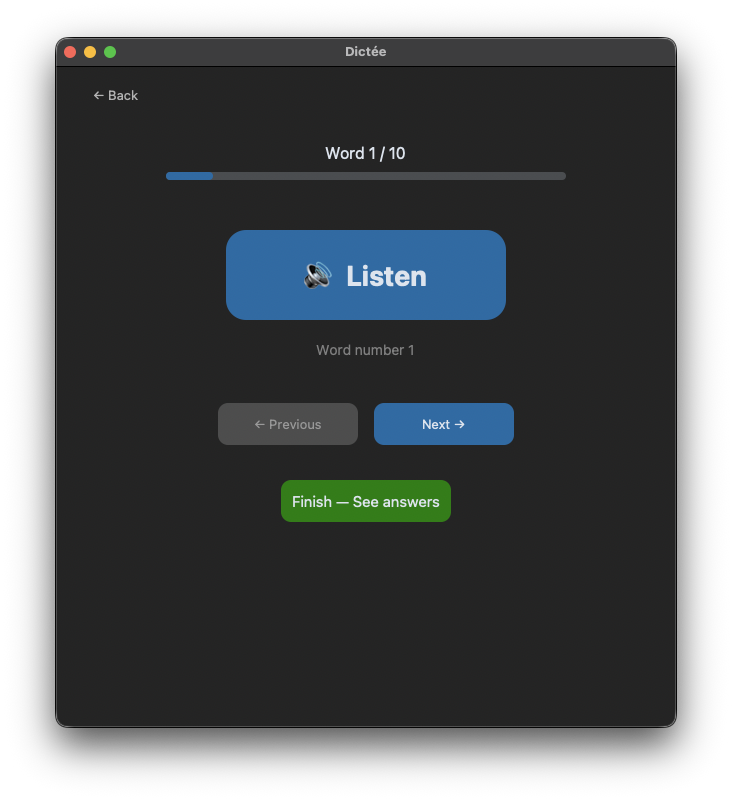
During the dictée, the screen shows nothing about the word itself: just a big “Listen” button, navigation controls, and progress. Exactly what she needed: audio without visual spoilers.
The technical bit
The whole thing is a single Python file using CustomTkinter for the UI and the macOS say command via subprocess for text-to-speech. No external APIs, no network calls, no dependencies beyond one pip package.
The TTS runs on a background thread so the UI doesn’t freeze. There’s a simple regex parser for stripping numbered prefixes. Saved dictées go to ~/.dictee/saved/ as JSON files. The i18n is a flat dictionary: no framework, just a STRINGS dict keyed by language code with an update_language() method on each page.
It builds to a standalone .app bundle with PyInstaller if you want to share it with someone who doesn’t have Python installed. The whole project is about 350 lines.
The real story
This isn’t really a post about a dictée app. It’s about what happens when the cost of building something personal drops to near zero.
A year ago, this would have been an evening project. I’d sketch out the UI, fight with Tkinter’s layout system, figure out the threading, debug the text-to-speech. Two or three hours minimum before my daughter could use it. Probably more like four.
Instead, I described the problem and had a working app before she finished her homework. The iteration loop was fast enough that I could add features (save/load, language toggle, numbered list parsing) while she was testing it. She’d say “can it do this?” and thirty seconds later it could.
This is where tools like Claude Code actually shine. Not on large, complex systems. On the small, personal, specific stuff. The app that only your family needs. The tool that solves exactly one problem in exactly the way you want it solved. These things were never worth the time before. Now they are.
If you already understand the thing you want to build, if you can describe the architecture, the flow, the constraints, the gap between idea and working software is almost nothing. You become a director instead of a typist. You’re still making every decision, still applying judgment about what’s right. You’re just not spending time on the mechanical parts.
My daughter used the app last night to study. I’ll report back on whether it actually helps with her test scores. But either way, she’s no longer squinting at Google Translate with one hand covering the screen. That alone feels like a win.
Update (April 2026): The test scores came in. Before the app, my daughter was averaging around 6/10 on her weekly dictées. Since she started using it, she hasn’t scored below 9/10. She’s genuinely proud of the improvement, which is the best part.
She’s also come back with feature requests. New things she wants it to do, ways it could work better for how she studies. We’ve been building those together, her describing what she needs and me implementing it. It’s turned into a fun little collaborative project between us, which is something I didn’t expect when I sat down that first night.